
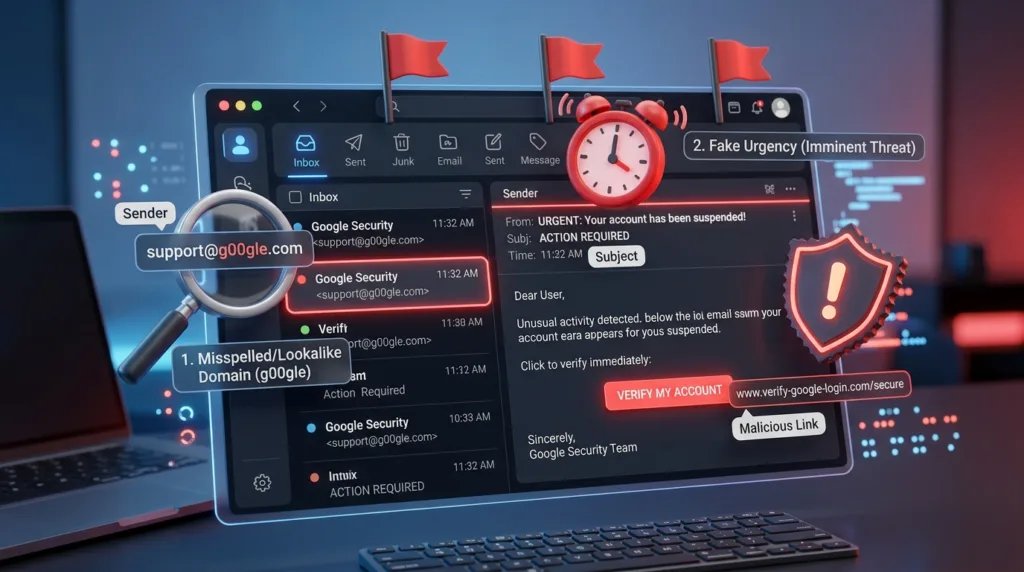
A convincing phishing email rarely announces itself with terrible spelling, a bizarre logo, and an obviously fake sender.
The more dangerous messages are often the ones that look ordinary.
They may resemble a shipping notice you were expecting, a Microsoft security alert, a request from your workplace, a payment problem from a familiar service, or a message from someone whose name you recognize. The design can be polished, the logo can be correct, and the wording may sound perfectly professional.
That is precisely why recognizing phishing has become less about spotting one obvious mistake and more about noticing when the pieces of a message do not quite fit together.
Phishing is an attempt to persuade you to reveal information, open a harmful attachment, send money, or visit a fraudulent website by making the request appear legitimate. The Federal Trade Commission describes a familiar pattern: scammers impersonate organizations people already know, then create a believable story involving suspicious activity, an account problem, an invoice, a payment, or another reason to click quickly.
The safest response is not to become suspicious of every email you receive. It is to develop a brief moment of verification before acting on a message that asks you to do something consequential.
That habit begins before you click anything.
Start with the situation, not the logo
Imagine opening your inbox and seeing an email that appears to come from a delivery company.
The subject says your package could not be delivered. The message contains the company’s familiar colors and logo, followed by a button asking you to confirm your address.
At first glance, everything seems plausible.
Instead of immediately searching for a typo, ask a broader question: does this message make sense in the context of what I am actually doing?
Are you expecting a package?
Did you recently place an order?
Does the company normally contact you at this email address?
Is the message asking you to do something unusual, such as re-enter payment information for a delivery you already paid for?
Context is useful because phishing messages often depend on probability rather than knowledge. A scammer does not necessarily know that you are waiting for a package. They can send the same delivery notice to thousands of people and rely on the fact that some recipients happen to be expecting one that day.
The same technique works with banks, streaming services, cloud platforms, online stores, and workplace accounts. A message that seems remarkably relevant may simply have landed at the right moment by chance.
The FTC advises people who receive an unexpected message containing a link or attachment to consider whether they actually have an account with the organization or know the person who contacted them. If you do, that does not prove the message is legitimate; it simply means you need to verify it through a channel you already trust. Its guidance on recognizing phishing scams recommends contacting the company using a website or phone number you know is genuine rather than the contact information supplied in the suspicious message.
That distinction is subtle but powerful. You are not asking the email to prove itself. You are checking the claim independently.
The sender’s name is only the first layer
Email applications usually display a sender name prominently.
You may see:
PayPal
Microsoft Account Team
HR Department
Amazon
That name is useful for readability, but it should not be treated as proof of identity. The visible display name and the underlying email address are separate pieces of information.
A message labeled “Microsoft Support” might actually come from an unrelated address.
Before acting on an unexpected email, expand the sender information and look at the complete address.
You are not necessarily searching for one magical sign that proves fraud. You are asking whether the address is consistent with the organization it claims to represent.
A message supposedly from your employer but sent from a random consumer email account deserves more scrutiny. So does an address containing subtle misspellings, extra words, unusual domains, or characters designed to resemble the legitimate company name.
The difference can be surprisingly small.
support@company.com
and
support@company-security-alert.com
may look related at a glance even though they belong to entirely different domains.
This is one reason learning how website and domain names are structured becomes useful beyond simple web navigation. What Is a URL? Understanding Website Addresses explains how to read the part of an address that actually identifies a site.
Google’s own phishing guidance recommends checking whether the sender’s email address matches the displayed name and examining other message details when something appears suspicious. Its Gmail phishing guidance also advises users not to enter passwords after following a questionable link and to visit the service directly instead.
The sender address is therefore an important clue, but not the entire investigation. A compromised legitimate account can also send malicious messages, which means a familiar address should reduce suspicion only when the content makes sense too.
Urgency is often there to interrupt your judgment
Many phishing messages create a small crisis.
“Your account will be suspended today.”
“Payment failed.”
“Unusual login detected.”
“Your package will be returned.”
“Respond within 30 minutes.”
The story varies, but the psychological mechanism is similar: the message tries to move you from evaluation to reaction.
Urgency is effective because people make different decisions when they feel they are about to lose access, money, an opportunity, or control of an account. Instead of examining the message carefully, they focus on removing the problem as quickly as possible.
This is why a suspicious email may feel more convincing when it makes you anxious.
A legitimate company can certainly send an urgent message. Banks warn about suspicious transactions. Employers communicate deadlines. Services notify customers about security events.
Urgency alone does not make an email fraudulent.
What matters is the combination: unexpected message, high-pressure language, and a request to immediately click a link, provide credentials, download something, or send information.
When those elements appear together, the appropriate response is not necessarily “this is fake.”
A better response is: I will verify this somewhere other than this email.
If a message claims there is a problem with your bank account, open the bank’s official app or type the website address you normally use.
If it says your Microsoft or Google account has suspicious activity, access the account directly rather than using the email’s button.
If it appears to come from a coworker asking for an unusual payment or confidential file, contact that person through another established channel.
You are replacing the sender’s chosen path with one you already trust.
Links deserve attention before they deserve a click
A hyperlink can display almost any text.
A button saying Review Account Activity does not tell you where the button actually leads.
Likewise, text that visually says www.example.com can technically link to a completely different address.
On a desktop computer, placing the mouse pointer over a link without clicking it will often reveal the actual destination somewhere in the browser or email interface.
Google specifically recommends this technique in its Gmail phishing guidance: hover over a link and compare the destination with what the message claims it should be.
The goal is not to become an expert in every character of a complicated URL.
Look for the actual domain and ask whether it belongs to the organization you expected.
A phishing link may use a long address designed to bury the important part among familiar words. It may also use a slightly altered spelling or a completely unrelated domain followed by a page name that contains the trusted company’s brand.
For example, an address can contain the word “paypal” somewhere in the path without being owned by PayPal.
This is why reading URLs from left to right as ordinary sentences can be misleading. The ownership of the site depends on the domain structure, not simply on whether a recognizable brand name appears somewhere in the address.
When you are uncertain, there is usually no need to solve the URL puzzle at all.
Close the message, open a new browser tab, and navigate to the company the way you normally would.
That simple detour removes much of the advantage the phishing email is trying to create.
A professional-looking email can still be fraudulent
Older advice often suggested looking for spelling mistakes as a primary phishing indicator.
Poor grammar can still be a warning sign, but it should not be your main defense.
Modern scams can be well written.
Logos can be copied. Corporate colors can be reproduced. Public information can help criminals imitate the language used by real businesses. Messages can even refer to the recipient by name.
A polished email therefore proves very little.
Conversely, a genuine message can contain awkward wording, formatting problems, or a minor typo.
What matters more is the behavior the email is trying to produce.
Is it asking you to reveal information that normally would not be requested by email?
Is it asking you to sign in after an unexpected warning?
Does it contain an invoice you do not recognize?
Is an attachment arriving without any context?
Does a routine business suddenly require an unusual payment method?
Is someone asking you to bypass the normal procedure because the matter is “confidential” or “urgent”?
The FTC notes that phishing messages frequently rely on stories involving account problems, suspicious activity, payment information, unfamiliar invoices, refunds, or links designed to trigger immediate action. The recurring feature is not bad writing; it is manipulation of the recipient into doing something that benefits the scammer.
That makes the requested action more revealing than the quality of the design.
Attachments require their own kind of skepticism
Not every phishing attempt sends you to a fake website.
Some messages try to persuade you to open an attachment.
An unexpected invoice, résumé, shipping document, spreadsheet, or business file can appear routine enough to escape attention, particularly in jobs where attachments arrive throughout the day.
The safest question is not “does this attachment look like a normal file?”
Ask instead: why did I receive it, and was I expecting it?
A familiar-looking filename does not make a file safe.
If an attachment appears to come from someone you know but the context is strange, verify with that person separately before opening it. Accounts can be compromised, which means a malicious message may genuinely come from an address you recognize.
The FTC warns that unexpected attachments and links can potentially lead to malware or attempts to collect sensitive information. Its recommended approach is deliberately conservative: if the message might be genuine, confirm it using known contact information rather than relying on the message itself.
This is especially important when the attachment asks you to enable additional features, install software, bypass a security warning, or enter login information after opening.
Each additional request should increase your caution rather than normalize the process.
Requests for passwords or financial information should change your posture immediately
There are messages you can evaluate casually.
A newsletter announcing a product update is one.
A message asking for your password, Social Security number, bank details, credit card information, or verification code is not.
Sensitive information changes the stakes.
Google advises users not to respond to requests for private information by email and warns specifically against entering a password after following a link in a suspicious message.
The safest habit is to separate the notification from the action.
An email may legitimately notify you that something happened.
You do not necessarily need to perform the action through that email.
If a message says your payment method expired, visit the service independently.
If it says your account needs attention, use the official app.
If it says a password reset was requested and you did not request one, inspect the account directly.
This approach is particularly valuable because a phishing page can closely imitate the legitimate login screen. Once you arrive there, visual appearance alone may no longer provide enough information to recognize the deception.
Prevention is easier when the decision happens before the link is opened.
Strong passwords also do not solve this problem by themselves. A password that would be impossible to guess can still be stolen if you voluntarily type it into a fraudulent page. How to Create a Strong Password You Can Actually Remember explains why password strength and password handling are separate parts of account security.
Two-factor authentication helps, but it does not make suspicious messages safe
Two-factor authentication creates another barrier if someone obtains your password, which is why it is one of the strongest practical improvements most users can make.
But phishing techniques can also target verification codes or approval prompts.
A fake login page might collect your password and immediately ask for the temporary code sent to your phone. If you provide both, the attacker may attempt to use them while they are still valid.
That is one reason the existence of 2FA should never turn into permission to click carelessly.
Authentication protects the account.
Judgment protects the authentication process.
If you have not already enabled an additional factor on important accounts, What Is Two-Factor Authentication and Why Should You Use It? explains how the major methods differ and why some provide stronger phishing resistance than others.
The two habits reinforce each other: safer sign-in methods reduce the consequences of a stolen password, while better phishing awareness reduces the likelihood that credentials are surrendered in the first place.
A message from someone you know can still deserve verification
One of the most convincing phishing messages is the one that genuinely appears inside a familiar conversation.
Suppose a coworker’s email account is compromised.
A scammer using that account may be able to send messages from the real address. The sender name matches. The domain matches. Previous conversation history may even provide enough context for the request to sound plausible.
The traditional advice to “check the sender address” is no longer enough in that situation.
Instead, look at whether the behavior fits the person.
Would this coworker normally ask you to buy gift cards?
Would your manager suddenly request a wire transfer outside the usual process?
Would a family member send a link with no explanation and immediately ask you to sign in?
Would a supplier unexpectedly change payment instructions by email?
When the request itself is unusual, verify it through another route.
Call the person using a number you already have. Send a separate message through an established conversation. In a workplace, follow the organization’s normal procedure for financial or confidential requests.
Google’s Gmail help specifically warns that suspicious messages may appear to come from someone you know if that person’s account has been compromised.
Trusting a person is not the same as trusting every message sent from their account.
What to do when the email might actually be legitimate
Caution does not require deleting every unusual message.
Sometimes an account really does have a problem.
A shipment really can be delayed.
A company really may need updated information.
The point is to move the verification process away from the message when the request carries meaningful consequences.
Suppose an email from your streaming service says your payment failed.
Instead of clicking the button, open the service’s app or enter its known website manually.
If the payment issue is genuine, you should normally see the same problem inside your account.
If nothing appears there, the email becomes considerably more suspicious.
The same technique works with security warnings.
If Google says there was a new sign-in, review your Google Account security activity directly.
If Microsoft reports unusual activity, go to your Microsoft account through your normal route.
If a bank reports a transaction you do not recognize, use the official app or the number printed on your card rather than a number included in the message.
This habit has an important advantage: it works even when you are not skilled enough to determine whether the email itself is authentic.
You do not have to win an argument with the message.
You simply verify the underlying claim somewhere else.
Reporting the message helps more than quietly deleting it
Once you are confident that an email is phishing, deleting it protects your inbox, but reporting it can help the email provider identify similar campaigns.
Gmail includes a specific option to report phishing messages, and Google’s phishing help page explains how to use it.
The FTC also asks consumers to report suspected scams and provides additional guidance through its phishing resource.
In a workplace, there may be a separate process. Some organizations provide a “Report Phishing” button, a security mailbox, or instructions from the IT department.
Follow that procedure when it exists, especially if the message appears targeted at employees or contains company-specific information.
Targeted phishing attempts can affect more than one person in the organization, so reporting the first suspicious message may help protect colleagues who received the same one.
The most reliable warning sign is often a mismatch
Phishing becomes easier to recognize when you stop searching for one definitive clue.
Instead, look for mismatches.
The sender claims to be familiar, but the address is unusual.
The message sounds routine, but the request is not.
The company is legitimate, but you do not have an account there.
You are expecting a package, but the message asks for information the carrier would not normally need.
The email claims there is an emergency, but your account shows no warning when you visit it directly.
The person is someone you know, but the request does not resemble the way they usually communicate.
Any one inconsistency may have an innocent explanation. Several together deserve attention.
Over time, this becomes less like following a checklist and more like reading messages with context.
You notice when something feels hurried, displaced, or unnecessarily secretive. Instead of asking whether the logo looks real, you begin asking whether the request makes sense. Instead of letting the email choose how you verify a problem, you choose your own route to the account or person involved.
That small shift is more useful than memorizing a catalog of scams because phishing tactics will continue to change.
The stories will change. The brands will change. The messages may become more polished.
What remains remarkably consistent is the attempt to move you from uncertainty to action before you have verified what is actually happening.
The best defense begins in that brief space between receiving the message and doing what it asks.

Alex Carter is a technology writer with five years of experience in the tech field. He now focuses on creating clear, practical articles that help beginners in the United States better understand computers, smartphones, online services, and everyday digital technology.