
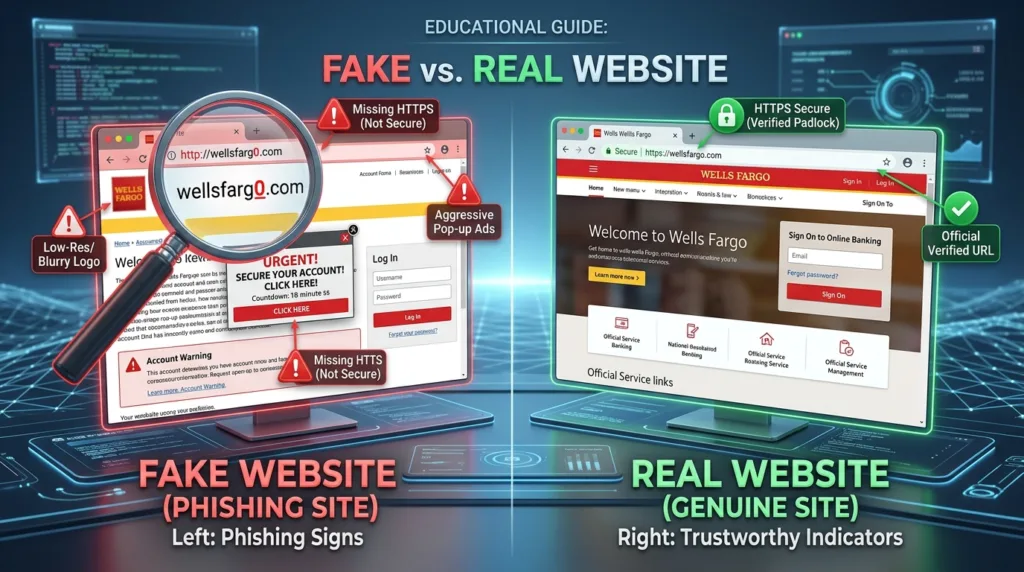
A convincing website can have a polished logo, professional photographs, customer reviews, an HTTPS connection, a detailed About page, and a checkout that looks completely ordinary. None of those features requires the business behind the page to be trustworthy.
That is what makes unfamiliar websites difficult to judge. The weakest fake pages are obvious; the more convincing ones borrow the visual language of legitimate businesses and depend on visitors making a decision before looking beyond the surface.
Consider a store that looks legitimate at first
Imagine finding an advertisement for a pair of headphones that normally costs around $350.
The advertised price is $79.
You open the page. The brand name is familiar, the product photography looks excellent, and the site includes a countdown reading:
FLASH SALE ENDS IN 14:37
There are hundreds of five-star reviews below the product. A banner promises free shipping, another says only three items remain, and the checkout accepts payment immediately.
Nothing in that description proves the site is fraudulent.
A real retailer could run a sale. A legitimate store can use countdowns, reviews, inventory messages, and professional product photography.
The better question is whether the different parts of the story support one another.
Start with the address.
Perhaps the page uses:
brand-clearance-outlet.com
when the company you expected normally operates at:
brand.com
That difference deserves attention before anything on the page does.
Our guide What Is a URL? Understanding Website Addresses explains how to identify the actual domain rather than being distracted by familiar words elsewhere in an address.
A fake site does not need to copy the legitimate domain perfectly. It only needs enough resemblance for someone moving quickly to stop examining it.
Do not ask whether the page looks professional; ask who is actually behind it
Website design has become inexpensive and accessible.
Templates can produce polished storefronts in minutes. Logos can be copied. Product descriptions can be duplicated from another retailer. Images can be downloaded from manufacturers or legitimate stores.
Visual quality is therefore weak evidence of identity.
Look instead for information that connects the webpage to a real organization.
A retailer might provide a business name, physical address, working customer-service information, shipping terms, refund policies, and other details that remain consistent across the site. None of these proves legitimacy individually, but together they create information you can verify.
Try the contact page.
Does it provide only a generic form, or is there a business address and another realistic way to reach the company? If an address is shown, does it correspond to the business when checked independently? Does the company name remain consistent between the footer, terms, checkout, and contact information?
Misleading pages often become less convincing around these details.
A storefront may use one business name on the homepage and another in its legal text. A return policy copied from somewhere else can mention a completely different company. An About page may contain vague claims while providing no useful information about who operates the service.
Even legitimate small businesses can have imperfect websites, so one awkward sentence or missing piece of information should not automatically become a verdict. The goal is to see whether a coherent identity emerges as you move beyond the sales page.
Read the offer as a claim that needs to make sense
Return to those $350 headphones selling for $79.
The price deserves investigation because it changes the story.
Retailers discount products. Clearance happens. Older models fall in price. Open-box and refurbished products can cost substantially less than new ones.
A dramatic discount becomes more concerning when the page simultaneously claims that the product is brand-new, current, in high demand, available in every color, and being sold at a fraction of the price charged by established retailers.
The Federal Trade Commission’s online shopping guidance recommends researching unfamiliar sellers and warns that unusually inexpensive brand-name goods can involve counterfeit products or other problems.
The principle extends beyond shopping.
A page offering a guaranteed job, an extraordinary investment return, an effortless software fix, a prize you never entered to win, or access to something normally difficult to obtain is making a claim. Before deciding whether the page looks trustworthy, decide whether the underlying claim is plausible.
Misleading websites benefit when presentation receives more attention than the offer itself.
A polished page can make an unreasonable proposition feel temporarily reasonable.
Urgency becomes more revealing when it tries to prevent verification
Countdown timers are not automatically deceptive. Neither are stock warnings or limited promotions.
The context matters.
Suppose the timer reaches zero, you refresh the page, and it begins again at fifteen minutes.
That tells you something about the timer.
Perhaps the site says ONLY 2 LEFT, but opening the page from another browser still produces the same number hours later. Or a banner announces that thirty-seven people are currently viewing the product even though the site provides no way to know whether that claim is real.
These mechanisms become more concerning when their apparent purpose is to shorten the time available for thought.
The FTC identifies urgency as a recurring feature of scams: scammers often want people to act before verifying the story independently.
That does not mean every sentence containing “limited time” is fraudulent. Ordinary businesses use urgency in marketing every day.
Look at what the urgency is asking you to skip.
A legitimate opportunity usually survives a minute spent checking the company name, reading the return policy, or opening another tab. A page that constantly pressures you not to perform those checks deserves greater skepticism.
Leave the website and see what the rest of the internet says
One of the most useful checks takes place somewhere else entirely.
Search for the business name.
Then search for the domain itself.
You might try combinations such as:
company name reviews
company name complaints
website-address.com scam
The FTC recommends researching unfamiliar sellers and checking several sources rather than relying only on ratings displayed by the seller itself.
That last part matters.
A website controls what appears on its own pages. It can publish testimonials, star ratings, trust badges, customer photographs, and claims about thousands of satisfied buyers.
Independent sources are harder for the site operator to control completely.
Look beyond one review platform as well. Search results, business listings, social profiles, discussions, established review sites, and relevant government or consumer-protection resources can provide different pieces of the picture.
Our guide How to Use Google Search More Effectively explains how adding the domain, business name, exact phrases, and other qualifiers can make this kind of research more productive.
Search for a sentence from the page
There is another useful technique when something feels copied.
Take a distinctive sentence from the About page, refund policy, or product description and search for it inside quotation marks.
Finding the same paragraph on several unrelated websites does not automatically prove fraud. Product manufacturers distribute descriptions, legal templates exist, and businesses sometimes legitimately reuse standardized material.
But discovering that the supposed story of a “family business founded in 2008” appears word-for-word on five unrelated stores is worth noticing.
The same approach can expose copied policies that still contain another company’s name.
You are looking for consistency, not one magic test.
HTTPS is valuable, but it answers a narrower question
A secure connection is important when transmitting information online.
When a website uses HTTPS correctly, the connection between your browser and that site is encrypted. This helps prevent information exchanged over the connection from being read or altered by someone simply observing the traffic.
What HTTPS does not establish is whether the website operator is honest.
The FTC explicitly notes in its online-shopping guidance that scammers can use encrypted websites too.
Google makes the distinction as well. Chrome’s website connection guidance advises users to check the address even when the connection itself is secure.
Think of HTTPS as protecting the route between you and a destination. You still need to know whether you chose the correct destination.
This is why the old advice to “look for the padlock and you’re safe” is incomplete. Modern fraudulent sites can obtain HTTPS without difficulty.
The browser’s security indicators remain useful; they simply should not carry more meaning than they actually provide.
How to Tell If a Website Is Safe to Visit examines that distinction more deeply, including browser warnings, HTTPS, downloads, and site behavior.
Browser warnings deserve a different level of attention
A vague feeling that a page looks unusual is one thing.
A full browser warning is another.
Chrome’s Safe Browsing system checks for known or suspected threats including phishing, malware, abusive websites, and social-engineering attacks. Google’s guidance on unsafe-site warnings explains that Chrome can display prominent warnings when it believes a destination is dangerous.
Do not treat those warnings as decorative obstacles.
A website might insist that the browser warning is a mistake and tell you to click through anyway. Legitimate sites can occasionally be flagged incorrectly, but an ordinary visitor rarely needs to override a major security warning merely because a page promises a discount, download, login, or prize.
There is a meaningful difference between independently determining that a technical false positive occurred and clicking Proceed anyway because the page itself told you to.
When the browser actively warns against continuing, the burden of proof should move heavily toward the website.
Pay attention to what the page eventually asks you to do
Sometimes a site looks ordinary until the transaction reaches its final step.
A familiar checkout suddenly instructs you to pay through cryptocurrency.
A seller asks you to leave the marketplace and send money directly through another app.
A supposed company demands gift cards.
A technical-support page tells you to install remote-access software and call an unfamiliar number immediately.
A login page asks for credentials that do not fit the service you thought you were using.
These actions provide stronger evidence than cosmetic details such as unusual fonts or awkward grammar.
The FTC advises consumers to be particularly cautious when sellers insist on payment methods that make recovery difficult, including gift cards, wire transfers, certain payment apps, and cryptocurrency. Its shopping guidance also notes that credit cards generally provide stronger dispute protections when something goes wrong.
For ordinary online accounts, the same principle applies to information rather than money. Ask whether the page has a reasonable reason to request what it wants.
A recipe website suddenly requesting your Microsoft password deserves more explanation than a Microsoft login page does.
How to Protect Your Personal Information Online explores how apparently small requests for personal information can accumulate into something much more valuable.
Even search results can lead to an impersonator
Appearing near the top of Google does not transform a website into an official source.
Some prominent results are advertisements, and scammers can use search advertising or search-engine optimization to place misleading pages in front of people who are actively trying to reach a legitimate organization.
The FTC warned about this specifically in its guidance on misleading online search results. Its recommendation is particularly relevant when looking for a company’s customer-service number, paying a bill, or trying to reach a government service: verify that you actually reached the organization you intended.
Consider someone searching:
airline customer service
The first prominent result may look connected with the airline. A phone number displayed beside a familiar name can feel official before the user has visited the airline’s real domain.
The safer path, when the organization is known, is often to use its established website directly and find contact information there.
This connects with the distinction explained in How Search Engines Work: A Simple Guide for Beginners: visibility in search results and institutional identity are different things.
A page can be misleading without being completely fake
This category deserves attention because not every problematic website is an outright impersonation.
A real business can use misleading pricing.
A real publication can present advertising in a way that resembles editorial content.
A legitimate subscription service can make cancellation conditions difficult to notice.
A product page can exaggerate what a product does without pretending to belong to another company.
A page can use fabricated scarcity, selective testimonials, or ambiguous wording while operating on a genuine domain.
That means website evaluation should not stop after confirming that the company itself exists.
Read what the page is actually claiming.
Look for qualifications near the offer. Check whether recurring charges, trial periods, shipping costs, return restrictions, or other important conditions appear only later in the process.
For unfamiliar shopping sites, the FTC recommends reviewing shipping, return, and refund terms before purchasing.
The distinction is useful: identity tells you who is speaking; the page itself tells you what they are promising.
Both need scrutiny.
A five-minute investigation of our fictional store
Return to the headphone store from the beginning.
The homepage still looks excellent.
Now we have more information.
The domain is not the manufacturer’s known domain.
Searching the store name reveals almost no established presence, despite the About page claiming that the company has operated for fifteen years.
The street address belongs to an unrelated building.
The return policy contains another store’s name in one paragraph.
The fifteen-minute sale timer restarted after the page was refreshed.
Several customer testimonials appear word-for-word on unrelated stores.
The product costs less than one-quarter of what major retailers charge.
At checkout, the store heavily pushes a payment method with limited recourse.
None of those observations came from judging the color scheme or finding a typo.
They came from comparing claims with evidence.
That is a much stronger method because sophisticated fake sites can improve their appearance far more easily than they can build a long, consistent, independently verifiable history.
Common questions about suspicious websites
Does HTTPS mean a website is legitimate?
No. HTTPS indicates that the connection to the site is encrypted when properly configured. Fraudulent sites can use HTTPS too. The domain, website identity, claims, behavior, and surrounding evidence still matter.
Can a fake website appear in Google results?
Yes. Search visibility is not proof that a site is legitimate. Misleading sites can appear in ordinary results or advertisements, which is why important destinations should still be verified.
Does bad grammar mean a site is fake?
Not by itself. Legitimate websites can contain mistakes, translations can be awkward, and small businesses may have imperfect copy. Conversely, fraudulent websites can have excellent writing. Treat language quality as context rather than a decisive test.
Are customer reviews on the website useful?
They may provide information, but reviews controlled entirely by the seller are weak independent evidence. For an unfamiliar business, compare what appears on the site with information from sources the seller does not directly control.
Verification works better than intuition
Your instincts can be useful. An implausible price, strange address, urgent demand, or unfamiliar payment method may be what first makes you suspicious.
Do not stop at the feeling.
Check the domain. Identify the organization. Read the terms. Search beyond the page. Compare the claims with established sources. Pay attention to what information or payment method the site eventually requests.
Sometimes those checks resolve the concern quickly. You discover that the store is a real authorized seller, the unusual domain belongs to a legitimate regional operation, and the discount has a clear explanation.
Other times, each additional check makes the story weaker.
That difference is valuable because website safety is rarely determined by one visual clue. What you are really testing is whether the page remains credible when information from inside the website is compared with information the website does not control.
A convincing page can manufacture appearances.
Consistency is much harder to manufacture everywhere.

Alex Carter is a technology writer with five years of experience in the tech field. He now focuses on creating clear, practical articles that help beginners in the United States better understand computers, smartphones, online services, and everyday digital technology.