
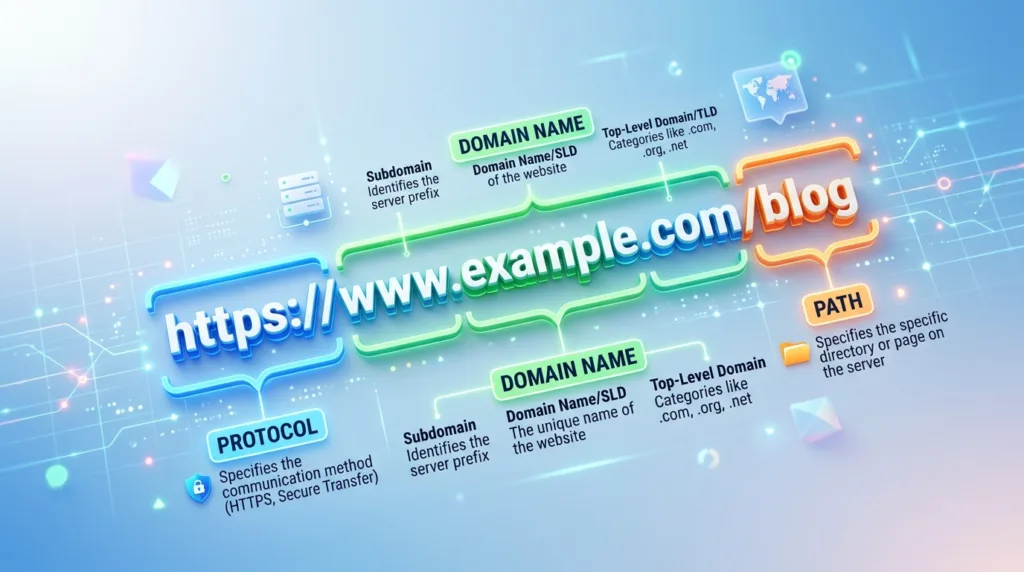
Every time you open a webpage, share a link, follow a search result, or bookmark something for later, a URL is working in the background. Some are as simple as https://example.com, while others stretch across several lines and contain slashes, question marks, numbers, symbols, and words that seem almost impossible to interpret. They may look technical, yet most URLs follow a structure that becomes much easier to read once you know which parts actually matter.
Start with one complete address
Consider this fictional URL:
At first glance, it is one continuous string. In reality, several pieces are doing different jobs:
httpstells the browser how to communicate with the site.www.example.comidentifies the host and domain./guides/beginner-techpoints toward a particular resource or location within the site.?topic=securityadds information to the request.#passwordsdirects the browser toward a particular part of the resulting page.
Not every URL contains all of these pieces. A homepage may need little more than the protocol and domain, while a search page or shopping site can produce much longer addresses because it needs to preserve filters, search terms, product options, or other details.
Mozilla’s MDN documentation describes a URL, or Uniform Resource Locator, as the address of a resource on the internet. Browsers use URLs to locate webpages, images, documents, and other resources, although the everyday phrase web address is usually enough when you are simply trying to understand what appears in the browser bar.
The domain is the part worth learning to recognize quickly
In:
the part most people should learn to identify confidently is:
example.com
That is the domain name.
ICANN, the organization involved in coordinating the internet’s domain-name system, describes a domain name as the human-readable name used in URLs to identify an internet address. The ICANN explanation of domain names also explains why domains exist in the first place: computers communicate using numerical IP addresses, while names such as icann.org are much easier for people to remember.
A basic domain often contains a name followed by a top-level domain:
google.com
wikipedia.org
mit.edu
In these examples, .com, .org, and .edu are top-level domains. The section immediately before them is another part of the domain hierarchy.
Real addresses can be more complicated. Country-based systems sometimes contain structures such as:
bbc.co.uk
Reading domains therefore requires slightly more judgment than simply taking “the two words before the first slash” as a universal rule.
For everyday browsing, the useful skill is learning to identify the organization or service represented by the domain and checking whether that domain matches where you intended to go.
What comes before the domain can identify a particular part of the site
A URL may begin with something such as:
www.example.com
support.example.com
news.example.com
accounts.example.com
The words before the main domain are commonly called subdomains.
They allow one domain to organize different services or sections under related addresses. support.example.com might host customer support, while accounts.example.com could handle login and account management.
www is simply one familiar subdomain. Modern websites do not universally require it, which is why example.com and www.example.com may both lead to the same site.
Subdomains can matter when evaluating an unfamiliar link because the main domain still determines the broader internet address. Consider:
accounts.google.com
The important domain is google.com; accounts describes a service under it.
Now compare that with:
google.account-check-example.com
Seeing the word google near the beginning does not make this a Google domain. The actual domain in that fictional example is account-check-example.com.
This is one of the reasons understanding URLs has practical value beyond technical curiosity. How to Tell If a Website Is Safe to Visit discusses website trust more broadly, but recognizing the domain gives you a much better starting point than judging a page only by its logo or design.
HTTPS describes the connection, not the identity of the website
Most modern web URLs begin with:
https://
This first section is called the scheme. It tells the browser what kind of protocol should be used to access the resource.
For ordinary web browsing, the two names people are most likely to recognize are http and https. HTTPS adds encryption to the connection between the browser and the website, helping protect information while it travels across the network.
The distinction is important, although HTTPS should not be treated as proof that every website using it is trustworthy. A fraudulent site can also create an encrypted HTTPS connection. Encryption protects the communication channel; it does not independently establish the intentions of the person operating the destination.
That is why the domain and the context of the page still matter.
Modern browsers often hide part of the scheme from casual view or simplify what appears in the address bar, but the full URL still contains the information the browser needs. What Is a Web Browser and How Does It Work? explains the browser’s broader role in requesting and displaying web content.
The path usually tells the site which resource you want
Return to:
Everything after the domain beginning with /guides/... forms the path in this example.
A path can resemble a folder structure:
example.com/products/laptops
example.com/help/password-reset
example.com/blog/2026/article-name
That visual resemblance is useful, though modern websites do not necessarily store their pages in literal folders arranged exactly like the URL suggests. The path is ultimately information used by the website to identify the resource being requested.
Good paths can also make URLs easier for humans to understand. An address ending in:
/recipes/chocolate-cake
provides considerably more context than something like:
/page?id=48372
Both approaches can work technically. The first simply communicates more meaning before the page even opens.
Paths also explain why two links can belong to the same website while leading to completely different content. These addresses share a domain:
example.com/news
example.com/contact
example.com/account/settings
The domain identifies the site; the path helps distinguish where you are within it.
Question marks often introduce information being sent along with the request
Long URLs frequently become intimidating around the first ?.
Consider:
The part after the question mark is called the query.
Queries can carry additional information that the website uses when generating a response. A search engine might include your search terms, an online store could retain filters or sorting options, and a travel site might represent dates or passenger choices.
More complicated queries can contain several values joined together:
Here, the website may interpret one value as the search term and another as the preferred sorting method.
The exact meaning of query parameters depends on the website. There is no universal rule saying that q must always mean a search query or that sort must always control sorting, although conventions like these are common.
Queries are also one reason copied links can become surprisingly long. A webpage that looks simple in the browser may carry additional state, tracking information, referral information, filters, or other parameters in the URL.
You do not need to understand every parameter before sharing a normal link. It is still useful to recognize where the query begins because everything after the ? may be supplementary to the page’s core address.
A hashtag in a URL can point to a specific place inside a page
A URL such as:
contains a fragment, beginning with #.
Fragments can direct the browser toward a particular section of a page rather than merely opening the top. MDN describes fragments as a way to identify a specific part of a resource; in an ordinary webpage, the browser may scroll directly to the corresponding heading or element.
This is why clicking a link in a table of contents can suddenly move you halfway down a long article even though the browser never appeared to load a completely different page.
Fragments can also appear in URLs copied from tools that create links to specific text or sections.
Unlike the path and ordinary query information, the fragment is generally handled by the browser after the resource has been retrieved rather than being sent to the server as part of the request.
For everyday use, the main clue is visual: when the address contains #something, that final piece often describes where inside the resource the browser should take you.
Some URLs are meant to be read; others are mostly meant to work
A neatly designed address might look like:
The topic is recognizable immediately.
Another perfectly legitimate URL might look more like:
Human readability differs, but both can function as valid web addresses.
Modern web applications often create URLs dynamically. Maps, shopping sites, search engines, dashboards, cloud applications, and social networks may need to represent complex states within an address, resulting in strings that are far longer than a traditional webpage URL.
Length by itself does not tell you whether an address is dangerous.
Likewise, a short URL is not inherently trustworthy. Link-shortening services can intentionally hide a long destination behind a much smaller address, which makes context and destination verification more important when the source is unfamiliar.
Learning to read URLs should therefore focus on the parts with practical meaning rather than expecting every character to be understandable at a glance.
Why do some links end with strange symbols or extremely long codes?
A URL can contain characters such as %20, %3A, or long strings of letters and numbers because some information must be encoded into a format suitable for use inside a web address.
Spaces, for example, cannot always appear in a URL exactly as ordinary spaces appear in a sentence. Encoding can represent characters in a standardized form, which is why %20 is commonly seen where a space would otherwise occur.
Long identifiers may represent products, documents, sessions, database records, shared files, or other resources that do not have a convenient human-readable name.
Cloud-sharing links are a familiar example. A document might be reached through a long address containing an identifier that allows the service to locate the correct file.
Those strings can look suspicious simply because they are unfamiliar. Their appearance alone does not establish whether the link is legitimate, just as a clean-looking address does not guarantee safety.
The surrounding context and, particularly, the actual domain remain more informative.
Reading a URL from the right place makes unfamiliar links less confusing
Consider this fictional address:
Rather than trying to interpret the entire string at once, start with the domain relationship:
billing.example.com
The underlying domain is example.com, while billing is the subdomain.
Next comes:
/account/invoices
That is the path.
Then:
?id=4827
The query supplies additional information.
Finally:
#january
The fragment points toward a location within the resource.
This method scales surprisingly well. A complicated address can contain much more information than this example, but you rarely need to decode all of it. Knowing where the domain ends and where the path, query, and fragment begin already turns what looked like a random string into a structured address.
It also makes comparison easier. Two URLs can share the same domain while differing only in path; another pair may look similar at first but actually belong to different domains.
For a beginner, that distinction is much more useful than memorizing the formal specification for every possible URL component.
URLs are part of how the web remembers where things are
A link works because the browser receives an address describing the resource it should request.
Bookmarks preserve those addresses for later. Search engines return them as results. Websites connect pages to one another through them. People paste them into messages, documents, QR codes, and social posts to send somebody else toward the same destination.
The address may stop working when the resource moves or disappears, which is why old bookmarks sometimes lead to errors. Websites can redirect old addresses toward new ones, but that depends on how the site owner manages changes.
This also explains why URLs matter when organizing or publishing information online. A clear, durable address can remain useful for years, while a temporary or poorly maintained one may eventually lead nowhere.
You do not need to think about any of this during ordinary browsing. Most of the time, clicking the link is enough.
Understanding the structure becomes valuable at the moments when the link deserves a second look — when you want to know which site you are visiting, compare two similar addresses, remove unnecessary query information, understand why a bookmark opens halfway down a page, or simply make sense of what the browser is showing you.
A URL stops looking like an arbitrary collection of symbols once you know where to look first. The domain tells you where you are going; the remaining pieces refine what the browser should retrieve or where it should take you once you arrive.

Alex Carter is a technology writer with five years of experience in the tech field. He now focuses on creating clear, practical articles that help beginners in the United States better understand computers, smartphones, online services, and everyday digital technology.