
Airplane Mode sounds more restrictive than it usually is. Turning it on does not make a smartphone useless; it mainly changes which wireless connections the device is allowed to use, and modern iPhones and Android phones can often reconnect to Wi-Fi or Bluetooth while Airplane Mode remains active.
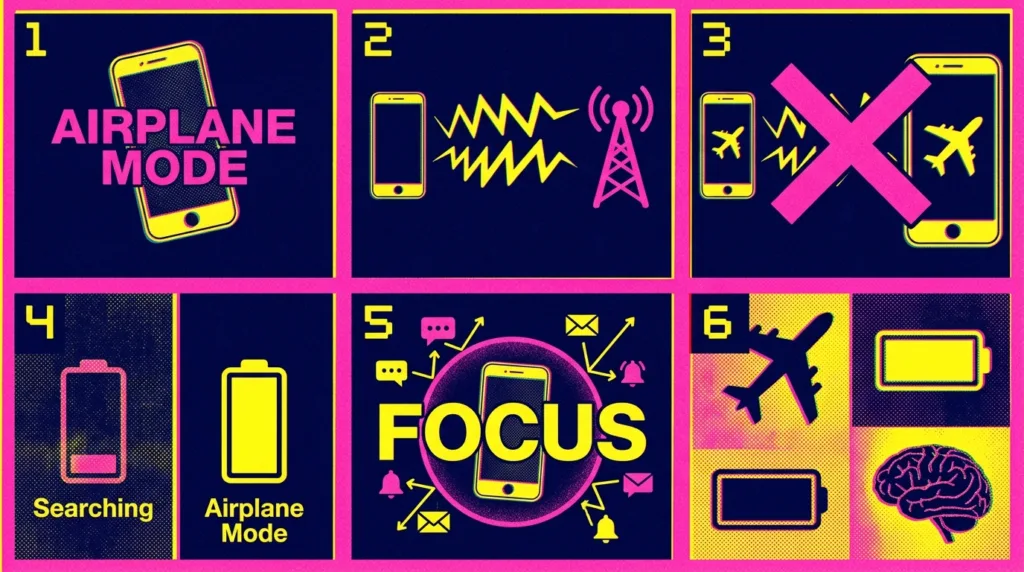
Airplane Mode primarily stops the phone from using cellular networks
The feature was created around one practical requirement: a device on an aircraft should stop communicating through its normal cellular radio when instructed to do so.
When Airplane Mode is turned on, the phone disconnects from the cellular network. Ordinary cellular calls, SMS messages, and mobile data therefore stop working until cellular connectivity is restored.
On current iPhones, Apple states that Airplane Mode disables cellular and Wi-Fi when first activated while Bluetooth can remain available. Apple’s official Airplane Mode guidance also explains that Wi-Fi and Bluetooth can be used while Airplane Mode is active when airline rules allow it.
On Pixel phones, Google’s Airplane Mode documentation explains a similar principle: Wi-Fi and Bluetooth can be turned back on after Airplane Mode is enabled, and the phone can remember that preference for future use.
That behavior explains something that can otherwise seem contradictory: you may see the airplane icon at the top of the screen while still wearing Bluetooth headphones and browsing through the aircraft’s Wi-Fi.
The cellular connection remains the part that Airplane Mode is primarily intended to suppress.
A flight no longer means spending several hours completely offline
Years ago, passengers were often told to turn electronic devices off for large portions of a flight.
Today, airline procedures commonly allow phones to remain powered on in Airplane Mode, although the airline’s instructions always take priority.
Once Airplane Mode is active, the aircraft may offer onboard Wi-Fi. You can then turn Wi-Fi back on, join the airline’s network, and use whatever services that connection supports.
Bluetooth can also remain useful.
Wireless earbuds can continue playing downloaded music or movies. A Bluetooth keyboard may remain connected to a tablet. A smartwatch can continue communicating in ways permitted by the device and airline.
This is why activating Airplane Mode should not be interpreted as “disable every wireless feature permanently until landing.”
It creates a different wireless state.
Cellular service is suspended, while certain short-range connections can be used again where allowed.
Before a flight, it is worth downloading anything you would be disappointed to lose access to: boarding information, entertainment, books, documents, music, or other content. Aircraft Wi-Fi varies widely in speed, availability, and price, so offline content remains useful even on flights advertising internet access.
Airplane Mode also creates a quick cellular reset
There is a reason people sometimes toggle Airplane Mode even when they are standing firmly on the ground.
Turning it on temporarily disconnects the phone from cellular networks. Turning it off forces the device to establish a fresh cellular connection.
That can occasionally help after the phone becomes stuck in an odd connection state.
For example, you emerge from an underground garage where there was no signal, yet the phone takes unusually long to reconnect. Or the device shows weak service in a location where you normally have strong coverage.
Turning Airplane Mode on for a short moment and then off again can prompt a new network registration.
Apple itself notes that enabling Airplane Mode can be used to force a signal refresh.
This is a useful troubleshooting step because it is fast and relatively low-risk. It does not erase network passwords, reset the phone, or remove account information.
It should not become a ritual for every network problem, though.
A carrier outage will not disappear because you toggled Airplane Mode. A broken SIM or eSIM configuration needs a different solution. Poor coverage remains poor coverage after the phone reconnects.
The technique helps when the connection state is the problem, not when the network itself is unavailable.
It can save battery in specific situations
Airplane Mode can reduce battery use because it prevents some wireless communication.
The benefit is particularly noticeable when cellular service is poor or absent.
A phone in an area with weak coverage may repeatedly work to maintain or re-establish a cellular connection. If you know you will not have useful service for a long period — perhaps on an underground journey, in a remote area, or during a flight — Airplane Mode can stop that cellular searching.
Google includes Airplane Mode among the options for limiting connectivity when trying to reduce battery consumption on Android.
The effect still depends on what you do afterward.
Turn on Airplane Mode, reconnect to Wi-Fi, stream video at high brightness, and use Bluetooth headphones for three hours, and the phone will obviously continue consuming energy.
Airplane Mode does not put the entire phone to sleep.
The display still uses power.
Apps can still run.
Downloaded games and videos continue working.
Wi-Fi and Bluetooth consume energy when enabled and active.
Its battery advantage comes mainly from removing cellular network activity and whichever additional radios remain disabled.
For a broader explanation of what actually affects runtime, see How to Make Your Smartphone Battery Last Longer.
Airplane Mode is not the same as Do Not Disturb
These controls are sometimes confused because both can make the phone seem quieter.
They solve completely different problems.
Airplane Mode changes connectivity.
Do Not Disturb or Focus changes interruptions.
Suppose you are going into a meeting.
Airplane Mode would disconnect cellular service. Unless you reconnect Wi-Fi, online messages and other network activity may stop reaching the device normally.
Do Not Disturb can leave the phone fully connected while silencing or filtering notifications.
For most meetings, classes, movies, or periods of concentrated work, a Focus or Do Not Disturb mode is therefore the more appropriate tool.
How to Manage Smartphone Notifications Without Missing Important Alerts explains how to reduce interruptions while keeping the phone connected.
The distinction becomes especially important when you are expecting something time-sensitive. A silent phone can still receive information. A disconnected phone may not receive it until connectivity returns.
You can still do quite a lot without cellular service
A phone contains plenty of functions that do not require a cellular network.
Depending on what is stored on the device, you can still:
- take photos and videos;
- read downloaded books or documents;
- listen to downloaded music and podcasts;
- watch downloaded movies or shows;
- play offline games;
- write notes;
- edit local documents;
- use alarms and timers;
- view previously downloaded information.
When Wi-Fi is re-enabled, many internet-based functions return as well.
Messaging apps may work through Wi-Fi.
Email can synchronize.
Web browsing becomes available.
Wi-Fi calling may also work when supported by the carrier, device, and account configuration.
Bluetooth can restore headphones, watches, keyboards, and other compatible accessories.
That is why Airplane Mode has become less about making the phone “offline” and more about controlling which radios are active at a particular moment.
Common questions about Airplane Mode
Can I use Wi-Fi while Airplane Mode is on?
Yes, on modern iPhones and many Android phones. After enabling Airplane Mode, you can turn Wi-Fi back on when its use is permitted. The phone may remember that preference the next time you activate Airplane Mode.
Can I use Bluetooth headphones in Airplane Mode?
Usually, yes. Current iPhones can keep Bluetooth available in Airplane Mode, and supported Android phones can also allow Bluetooth to remain active or be turned back on.
Will I receive text messages while Airplane Mode is on?
Traditional cellular SMS requires cellular connectivity, so those messages normally will not arrive through the cellular network while it is disabled. Internet-based messaging can continue over Wi-Fi when Wi-Fi has been re-enabled. Some carrier services, such as Wi-Fi Calling, can also change what is available depending on the carrier and setup.
Does Airplane Mode prevent roaming charges?
Disabling cellular connectivity prevents the phone from using normal cellular data while Airplane Mode remains active, which can help avoid unintended mobile-network use while traveling. If you later turn cellular connectivity back on, normal roaming conditions can apply again. Check your carrier plan rather than relying on Airplane Mode as the only travel-cost strategy.
Use the control for the problem it actually solves
Airplane Mode is useful because it gives you a fast way to suspend cellular connectivity.
During a flight, that satisfies the wireless restrictions communicated by the airline while still allowing Wi-Fi and Bluetooth where permitted.
During a cellular connection problem, toggling it can create a quick network reset.
In an area with no useful service, leaving it active can reduce unnecessary cellular searching and preserve some battery.
Those are practical jobs.
Using it simply because you want notifications to stop is less appropriate when Do Not Disturb can accomplish that without disconnecting you.
The airplane icon therefore does not mean the phone has entered some special isolated state where every wireless technology stops functioning. Modern smartphones treat Airplane Mode more selectively than that.
Once you understand which connection is being disabled, the feature becomes much less mysterious — and much easier to use only when it actually helps.

Alex Carter is a technology writer with five years of experience in the tech field. He now focuses on creating clear, practical articles that help beginners in the United States better understand computers, smartphones, online services, and everyday digital technology.