
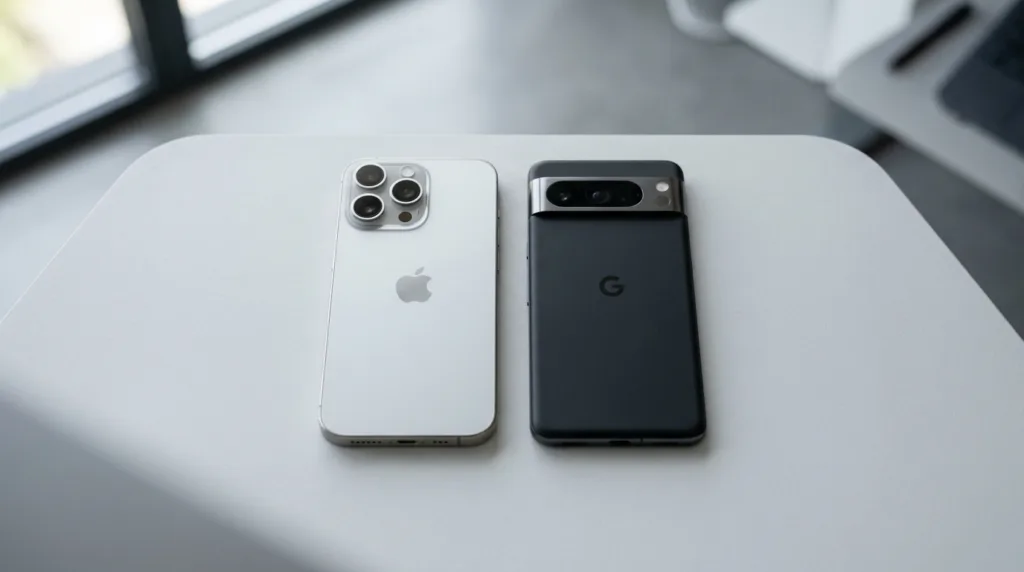
Choosing between Android and iPhone can feel like choosing between two competing camps. People defend one, criticize the other, and sometimes talk about features that matter mainly to experienced users. For someone buying a first smartphone, that noise can make a fairly practical decision seem much more complicated than it is.
Both platforms can handle the things most people expect from a modern phone: messaging, video calls, photos, navigation, banking, social media, music, web browsing, email, contactless payments, apps, and Bluetooth accessories. The difference is less about whether one phone can perform basic tasks and more about how the experience is organized around them.
There is also an important imbalance in the comparison. iPhone refers to phones made by Apple, all using iOS. Android is an operating system used by several manufacturers, including Google, Samsung, Motorola, and others. Two Android phones can therefore differ considerably in price, camera hardware, software design, update policy, and extra features.
A better first question than “Which one is best?” is: What do I want the phone to fit into?
The short comparison
A first-time buyer does not need to compare every technical specification. These are the differences most likely to affect ordinary use:
| Consideration | iPhone | Android |
|---|---|---|
| Choice of phones | Smaller, more controlled lineup from Apple | Wide range of models, brands, sizes, and prices |
| Software experience | Consistent across current iPhones | Core Android is shared, but manufacturers can change the interface and add features |
| Customization | Flexible, but Apple controls more of the overall experience | Generally more freedom to change defaults, layout, launchers, and other behaviors |
| Apps | Large App Store with most major services | Large Google Play ecosystem with most major services |
| Integration | Particularly strong with Mac, Apple Watch, AirPods, iPad, and other Apple products | Strong with Google services and varies by manufacturer, Windows integration, watches, earbuds, and other devices |
| Price range | Mostly midrange to premium pricing, with older models sometimes available for less | Extends from inexpensive phones to premium flagships and foldables |
| Updates | Apple controls both the phone and iOS rollout | Update timing and length depend on the phone manufacturer and model |
| Moving from another platform | Apple provides tools for moving from Android | Google provides tools for moving from iPhone |
None of those rows produces an automatic winner.
A wide Android price range is valuable when budget matters. A smaller iPhone lineup can make choosing simpler. More customization is useful to someone who wants it and largely irrelevant to a person who never changes the default home screen.
The best comparison begins when those differences meet your actual habits.
Your other devices can influence the decision more than the phone itself
A smartphone rarely operates alone anymore.
Someone who already owns a MacBook, Apple Watch, and AirPods may find that an iPhone fits naturally into that environment. Photos, messages, passwords, files, device handoff features, earbuds, and other services can work across Apple products with relatively little configuration.
The Apple Watch is an especially strong consideration because it is designed around the iPhone. Someone who already owns and wants to keep using one has a practical reason to remain within Apple’s ecosystem.
The Android side is less centralized because different manufacturers build different combinations of products. A Samsung phone can integrate closely with Samsung watches and earbuds, while Google’s Pixel phones connect naturally with Google’s services and Pixel accessories. Android phones also work with a broad range of Bluetooth devices and can fit comfortably into households that rely heavily on Gmail, Google Photos, Drive, Maps, and other Google services.
Windows users should avoid assuming that an iPhone or Android phone will somehow be unusable with their computer. Both can coexist with Windows. The details of file transfer, messaging integration, photo synchronization, and device features simply differ.
The useful exercise is to look around before looking at phone specifications.
Which laptop do you own? Which smartwatch do you use or want? Where are your photos stored? Which cloud service already holds your documents? Are members of your household using features that work better when everyone is on the same platform?
A phone can be excellent on its own and still create unnecessary friction when it does not fit the rest of your setup.
Android offers more choice, which is both an advantage and a responsibility
Walk into a store looking for an Android phone and the range can be enormous.
One model may cost a few hundred dollars and focus on battery life. Another emphasizes cameras. Premium phones can compete directly with high-end iPhones, while foldable devices introduce designs that Apple does not currently offer.
That variety gives buyers room to prioritize.
Someone who mainly needs messaging, maps, photos, and basic apps may not need premium hardware. Another buyer might willingly spend much more for a better camera system, faster processor, larger display, stylus support, or a folding screen.
The challenge is that Android alone does not tell you exactly what experience you are buying.
The manufacturer matters.
The individual model matters.
The software-support policy matters.
Storage, camera quality, display quality, durability, biometric features, charging behavior, and manufacturer-specific software can vary widely even though the phones all run Android.
This is why advice such as “Android has feature X” can sometimes be misleading. A feature available on one flagship Samsung or Pixel phone may not exist in the same form on an inexpensive device from another manufacturer.
When considering Android, compare the actual phones rather than treating the operating system as though it were one physical product.
iPhone reduces the number of decisions
Apple takes almost the opposite approach.
There are fewer current iPhone families to compare, Apple controls both the hardware and operating system, and the overall interface remains recognizable from one model to another.
That consistency can be reassuring for a first-time smartphone owner.
If a family member shows you how to change a common setting on a recent iPhone, the same general process is likely to look familiar on another recent iPhone. Accessories, repair information, support documentation, and software instructions also tend to revolve around a smaller number of device families.
The tradeoff is less choice in certain areas.
You cannot pick among six manufacturers while remaining on iOS. If you want an iPhone, Apple determines the basic range of designs and price levels available at that time. Buyers seeking a very inexpensive new phone or a highly unusual hardware design may find more options on Android.
A smaller catalog is neither inherently restrictive nor inherently convenient. It depends on whether you enjoy comparing possibilities or would rather narrow the decision quickly.
The apps you use probably exist on both, but a few exceptions can matter a lot
For mainstream smartphone use, the overlap between Android and iPhone is enormous.
WhatsApp, Instagram, Spotify, Netflix, Uber, Gmail, Microsoft apps, major banking apps, navigation services, popular games, and thousands of other services are available across both platforms.
A first-time buyer therefore should not assume that choosing one platform means abandoning ordinary apps.
The exceptions are worth checking before purchase when a particular app is essential to your work, school, hobby, medical device, smart-home setup, or other routine. Some specialized apps launch on one platform first. Others support particular hardware only on one system, and certain features can differ between the Android and iOS versions of the same service.
This takes only a few minutes to verify.
Open the App Store or Google Play listing for the essential app and check compatibility with the phone you are considering. For specialized accessories, consult the accessory manufacturer’s requirements rather than assuming Bluetooth alone guarantees every feature.
Apps can also behave differently because Android and iOS give developers different system capabilities and restrictions. The core service may be the same while background behavior, file access, notifications, widgets, or integration with other apps differs.
For most beginners, those differences remain invisible until a specific need makes them relevant.
Customization matters only if you actually want to customize
Android has long been associated with greater flexibility.
Depending on the device, users can change default apps, arrange the home screen extensively, install alternative launchers, use widgets, modify visual behavior, and interact with files in ways that can feel closer to a traditional computer.
Modern iPhones also offer substantial personalization, including widgets, customizable Lock Screens, different home-screen arrangements, and options for default apps in supported categories. Apple has gradually expanded those controls while maintaining a more standardized overall environment.
The practical difference is not whether one system can be personalized and the other cannot.
It is how far the system encourages you to reshape the experience.
Some people enjoy spending an afternoon adjusting icons, widgets, shortcuts, default applications, and home-screen behavior until the phone works exactly the way they prefer.
Others leave everything almost exactly as it appeared on day one.
For that second group, customization should carry very little weight in the buying decision.
A feature has value only when it changes how you will actually use the device.
Think about price over the entire time you expect to keep the phone
Comparing only the cheapest advertised price can distort the decision.
The purchase price matters, especially because Android provides many lower-cost options, but several other expenses can appear during ownership: storage capacity, cases, chargers, screen protection, repairs, cloud-storage plans, accessories, and eventually replacement.
Longevity matters too.
Software and security updates keep a phone usable and protected after the hardware leaves the store. Apple controls iOS updates directly for supported iPhones. Android updates depend on the manufacturer and the specific model, so buyers should check the stated support policy for the exact device rather than relying on a general statement about Android.
Google’s Android Help documentation explains how Android updates are delivered and notes that update schedules vary by device, manufacturer, and mobile carrier.
For iPhone, Apple publishes software updates directly for compatible devices and provides current iPhone update instructions.
A cheaper phone that no longer meets your needs after a short period can eventually cost more than expected. An expensive flagship can also be wasteful when you replace phones frequently or never use the features that justified the premium price.
Choose a price range together with an ownership horizon.
“How much do I want to spend?” and “How many years do I expect to keep this?” belong in the same conversation.
Switching platforms is easier than it used to be, but not everything moves perfectly
Fear of migration can keep people on a platform they no longer want.
Both Apple and Google now provide official tools for moving between ecosystems.
Apple’s Move to iOS guidance covers transferring supported content from an Android device during iPhone setup. Depending on the devices and setup, this can include contacts, messages, photos, calendars, accounts, and other supported information.
Google provides a corresponding guide for moving from iPhone to Android, including procedures for copying supported apps and data and handling services such as iMessage during the transition.
The word supported matters.
Not every app transfers its internal data in the same way. Paid applications may need to be purchased again when licenses belong to a different app store. Some conversations or media libraries have their own migration procedures. Authentication apps, banking apps, eSIMs, health data, and specialized services can require additional attention.
Before switching, make a short list of what would be genuinely painful to lose:
- photos and videos;
- contacts;
- messages;
- WhatsApp or another important messaging history;
- authenticator access;
- notes and calendars;
- files stored locally;
- paid or specialized apps.
Then verify those specific items.
A new phone is also a good moment to make sure important photos and documents exist somewhere other than the old device. How to Back Up Important Photos and Documents explains why moving data and backing it up are related but not identical tasks.
Try the phones instead of evaluating only their feature lists
A specification sheet cannot tell you whether a phone feels comfortable in your hand.
Screen size sounds abstract until you try typing with one hand. A large phone can make videos and maps easier to view while feeling cumbersome in a pocket. A compact model may be more comfortable but offer less screen space for reading.
The same applies to interface preferences.
Spend a few minutes opening Settings, switching between apps, using the camera, typing a message, adjusting volume, and returning to the home screen. These are mundane actions, which is precisely why they matter. You will perform them far more often than most headline features advertised during a product launch.
Camera comparisons deserve similar realism. Both platforms include phones capable of excellent photography, particularly at higher price levels. The actual comparison is between specific models and the kinds of photographs you take.
Someone photographing children indoors may care about different camera behavior from someone who primarily photographs landscapes. A person who rarely takes pictures should not let camera rankings dominate the purchase.
Battery life is another model-specific characteristic rather than a simple Android-versus-iPhone verdict. Screen size, processor, battery capacity, software, signal quality, applications, and usage patterns all influence the result.
Our upcoming guide How to Make Your Smartphone Battery Last Longer will focus on the habits and settings that affect daily battery use regardless of which platform you choose.
A simple way to make the final decision
After comparing dozens of features, buyers sometimes end up less certain than when they started.
Reduce the question.
Choose an iPhone when the Apple ecosystem already matters to you, you value consistency across devices, the available models fit your budget, and you prefer Apple’s approach to hardware and software.
Choose an Android phone when you value a wider choice of prices and hardware, want to compare several manufacturers, prefer greater flexibility in how the phone behaves, or find a specific Android model whose features fit your needs particularly well.
Then allow individual phones to override the generalizations.
An inexpensive Android phone should not be compared with Apple’s most expensive iPhone as though the operating systems caused every difference. Likewise, a premium Android flagship and an entry-level model do not represent the same hardware experience merely because both use Android.
Once you have narrowed the platform, compare two or three actual phones within your budget.
Check storage.
Check the size in your hand.
Look at the manufacturer’s software-support commitment.
Make sure your essential apps and accessories work.
Consider how easily the phone fits the devices and services you already use.
After that, the operating-system debate becomes much less dramatic.
For a first-time buyer, the better phone is rarely the one that wins the most arguments online. It is the one whose compromises you are least likely to notice in ordinary life.

Alex Carter is a technology writer with five years of experience in the tech field. He now focuses on creating clear, practical articles that help beginners in the United States better understand computers, smartphones, online services, and everyday digital technology.